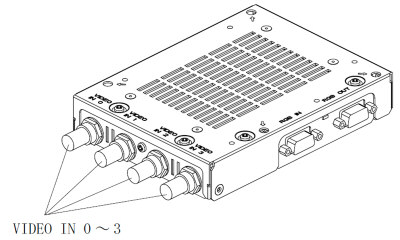
| On GP, you can display up to 4 screens from 5 inputs of 4 external video camera (VIDEO) inputs and 1 PC image (RGB) input.
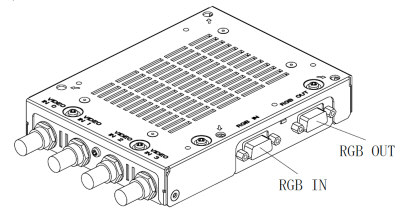
There is also 1 GP image (RGB) output, and it is possible to display the GP screen on an external monitor.
|
| Video Cable |
| | Connecting BNC Connector to VIDEO IN 0 - 3 |
|
| 
|
| | | Input Specification: | NTSC/PAL Type | | No. of Interface: | 4 | | Connector: | 75 Ohm BNC (Receptacle) | | Recommended Connector: | BNC-P-3DV-SA <Hirose Electric Co., Ltd.> | | Recommended Cable: | 3C-2V Coaxial Cable |
|
|
| RGB Cable |
| | Connecting Dsub15-Pin Connector to RGB OUT or RGB IN. |
|
| 
|
| | | Input Specification: | VGA/SVGA | | Output Specification: | 640 x 480 Dots (AGP-3500T/3550T)
800 x 600 Dots (AGP-3600T/3650T) | | No. of Interface: | 1/ Each | | Connector: | Dsub15-Pin (Receptacle) | | Recommended Connector: | XM4K-1543 <Omron Corporation> | | Recommended Cable: | XM2S-0913 <Omron Corporation> | Recommended RGB Cable:
(With Both-End Connector) | FP-CV00(2.5m) <Digital Electronics Corporation>
FP-CV01(5.0m) <Digital Electronics Corporation> |
|
|
| | Important | | * | Please make sure that RGB Output Cable is shorter than 5m. |
|
|
