| 1. | Start the [Control Panel] of the Start Menu. |
| 2. | Start the [Display]. (In the case of Windows XP, it’s in the category of Display and Theme on the desktop.) |
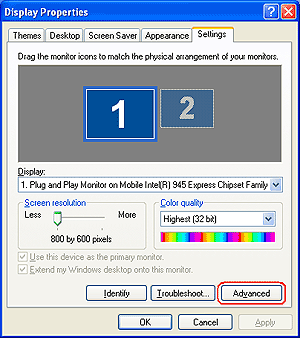
| 3. | Click [Advanced] in the [Settings] tab |
|  |
|
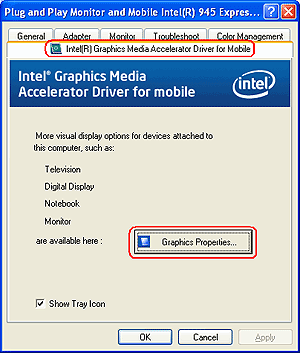
| 4. | Click [Graphic Properties] of the [Intel(R) Graphics Media Accelerator Drive for Mobile] tab. |
|  |
|
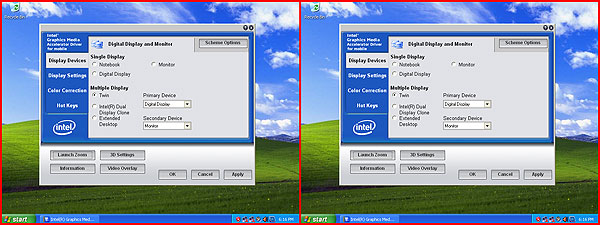
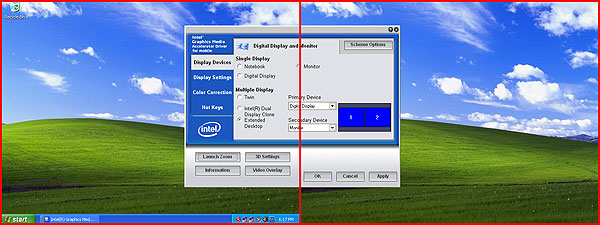
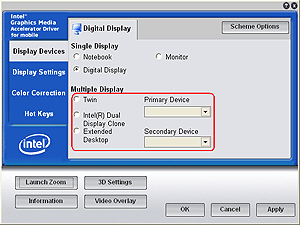
| 5. | Select the menu desired to display from [Multiple Display] of the displayed property screen.
* Set main monitor as primary device and set extended monitor as secondary devece. |
| 
|
| | [Notebook] | Do not select not to stop display signal. | | [PC Mpnitor] | Monitor connected with analog RGB cable. | | [Digital Display] | Monitor connected with DVI cable. |
|
|
| *Refer to "Types of Mutiple Displays" above about each menu. |
|
| 6. | Click the [Apply] button. |